
Khanmigo alternatives for live, interactive tutoring
Khanmigo is text-only. Eight alternatives compared side by side — Studdy, Synthesis, Snorkl, CereBRO, Gemini Live, Professo, Napkin, and ours — plus the four-minute test that settles it.
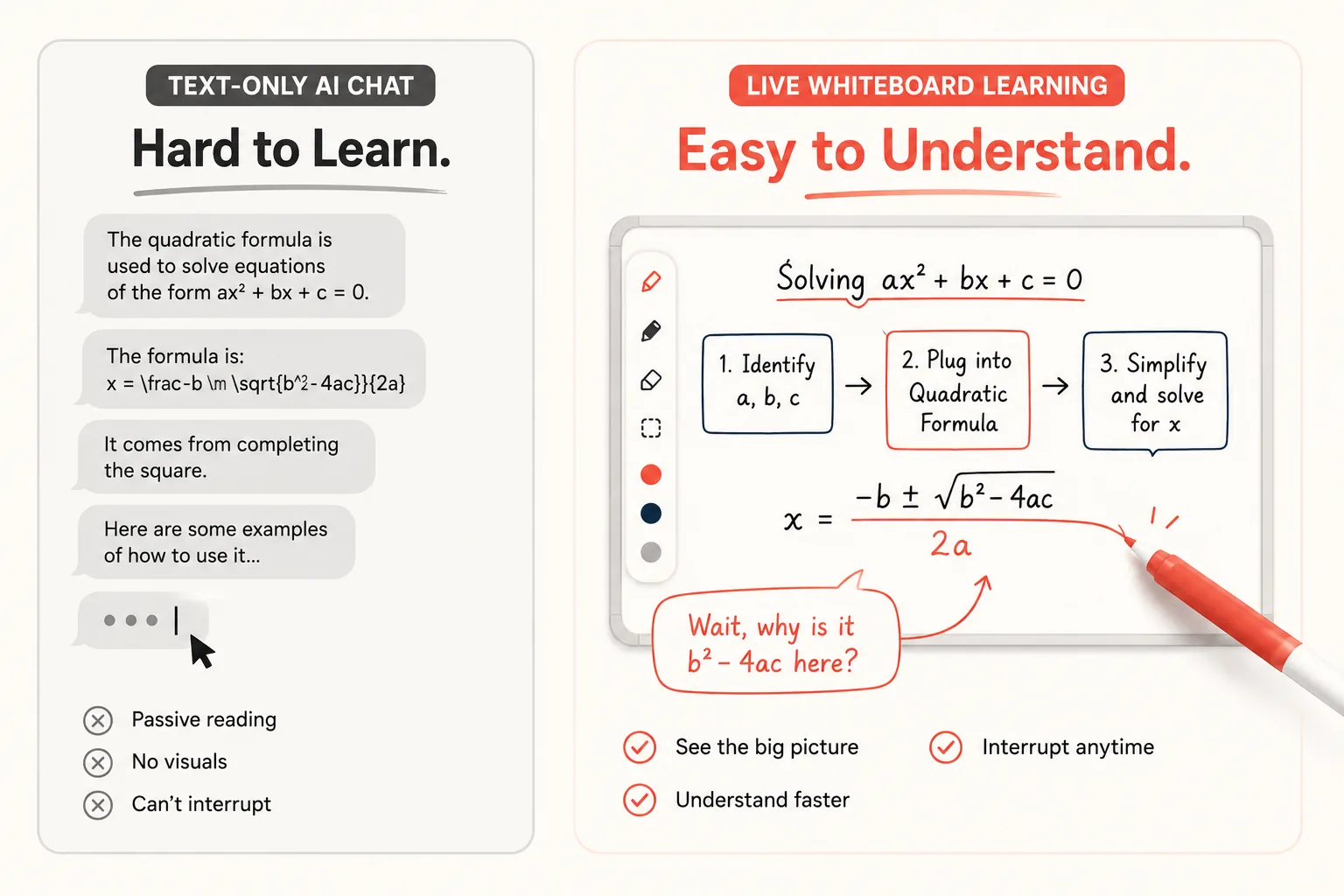
Khanmigo is good at the thing it was built for. It asks instead of tells, it sits inside Khan Academy's content library, and for a student already working through that library it removes a real problem: getting stuck alone at ten at night.
What it does not do is talk while showing you something.
Every exchange is typed. You read a question, you type an answer, you read the reply. For a lot of subjects that is fine. For anything with a shape — a circuit, a proof with three branches, a system with parts that feed each other — typing back and forth means holding the diagram in your head while also holding the conversation. That is two jobs, and one of them is the one you came to learn.
This is the gap the tools below are trying to fill. They fill it in genuinely different ways, and the differences matter more than the feature lists suggest.
The comparison, in one table
| Tool | How you interact | Voice | Visuals appear | You can draw on it | Interrupt mid-explanation | Multi-child |
|---|---|---|---|---|---|---|
| Khanmigo | Text chat | No | No | No | n/a | Up to 10 |
| Studdy | Voice + narrated visuals | Yes | Illustrations | No | Yes | Not stated |
| PapinAI | Voice + editable whiteboard | Yes | Diagram objects | Yes — and it builds on yours | Core design | No |
| Professo | Voice + whiteboard | Yes | Whiteboard | Not stated | Not stated | Yes |
| Synthesis Tutor | Visual canvas | Limited | Canvas | Yes | Not stated | Yes |
| Snorkl | Student draws | Records | Student's own | Yes — that is the point | n/a | Classroom |
| CereBRO | Voice | Yes | No | No | Not stated | Up to 5 |
| Gemini Live | Voice | Excellent | No | No | Yes | No |
| Napkin AI | Text → diagram | No | Diagrams | Edit after, not during | n/a | No |
Checked August 2026. Most rows come from each product's own site; the Studdy row comes from actually signing up and using the free tier, because the site and the product turned out to say different things. "Not stated" means the vendor does not publish it and we did not want to guess on your behalf. Verify anything that decides your purchase — including our column.
What "live and interactive" actually splits into
The phrase gets used for two capabilities that have almost nothing to do with each other.
Voice means the tutor speaks and hears. The gain is pace: talking is roughly three times faster than typing, and a spoken question can be half-formed in a way a typed one usually is not. You ask "wait, why that one" without composing a sentence.
A whiteboard means the explanation has a place to live. Structure gets shown rather than described, and it stays on screen after the sentence that produced it has gone.
A tool can have either without the other, and most do. The combination is rarer than the marketing implies — and the reason is not technical difficulty. Once a tutor is both speaking and drawing, it has to survive being interrupted mid-drawing, and that turns out to be the hard part.
The alternatives, and what each actually gives you
Studdy is the closest thing to what we build, and we would rather say so than have you find out. Voice narration, visuals that appear as the lesson goes, upload your own assignment or past paper, broad subject coverage from biology to economics, and you really can cut in with a question mid-explanation. If you try one tool from this list alongside ours, make it this one.
One thing worth knowing before you assume it is the same product, and we only found it by using the free tier rather than reading the page: the visuals are illustrations, not a whiteboard you can touch. A picture is generated to go with what is being explained — often a genuinely lovely one — and you watch it. There is no pen, no shapes, nothing to drag. You cannot sketch your own version of the idea, and you cannot hand it something you drew and ask it to continue from there. Interaction is voice and chat.
Whether that matters depends entirely on how you learn. If you want to watch a well-illustrated explanation and ask questions during it, that is a complete product and the illustrations are better than ours. If you want to think with your hands — sketch the wrong version, be corrected on it, draw two boxes and ask what connects them — that is a different tool, and it is the one we are building.
Synthesis Tutor is the strongest of the visual-first options for younger learners. Built around reasoning problems on an interactive canvas, with pedagogy that is unusually well thought through — genuinely building intuition rather than marching you to an answer. Its scope is deliberately narrow: mathematical reasoning, roughly primary through early secondary. Outside that range it is not the tool.
Snorkl flips the direction. The student works on the whiteboard and records their thinking; the AI responds to what they drew and said. For showing your working and getting feedback on the method rather than the answer, that is the right shape — and it is built for classrooms, where a teacher wants to see thirty students' reasoning at once. It is a feedback tool more than a teaching one.
CereBRO leads with voice and a freemium tier, and supports several children on one account. Useful if the constraint you are solving is household logistics rather than subject depth.
Gemini Live has the best raw conversation of anything here. The voice is natural, latency is low, and interruption works properly. It also has no persistent whiteboard — you can share a screen and talk about it, but nothing is being built that stays. A brilliant conversational partner, not a tutor with a marker.
Professo combines live voice with an interactive whiteboard and adaptive paths, and is aimed squarely at this gap.
Napkin AI appears on lists like this one, and it should not — not because it is weak, but because it is not a tutor at all. You paste text you have already written and it generates diagrams, flowcharts, and infographics from it. No voice, no lesson, nobody teaching. It is genuinely good at what it does, and if your actual problem is "I understand this but my slides are ugly", it is the right tool and everything else here is the wrong one. It just cannot explain something you do not yet understand.
Khan Academy itself, without Khanmigo, is still one of the best free things on the internet. Video plus graded exercises plus mastery tracking. If your student needs practice more than explanation, no AI tutor here replaces it.
Where PapinAI fits, and where it does not
PapinAI is an AI tutor that draws while it speaks, and can be interrupted mid-drawing.
The specific behaviour: you ask something, and the answer arrives as objects on a whiteboard — boxes, arrows, labels — placed one at a time in step with the sentence explaining each one. If you speak or type while it is drawing, it stops. It does not finish the sentence, and it does not start over. It answers your question by annotating what is already on the board, then carries on from where it stopped.
That last part is the whole design. A tutor that restarts when interrupted teaches you not to interrupt, and not interrupting is exactly the habit that leaves you nodding along to something you did not follow.
Two consequences that are not obvious from a feature list:
The board is memory, not decoration. Every object has an identity, so twenty minutes later you can say "the box on the left" and it knows which one. It refers back to its own drawing the way a lecturer points at the board behind them.
You can draw too, and it builds on what you drew rather than drawing a tidier version beside it. Sketch two boxes, label them, and ask it to connect them — the connection attaches to your boxes, in the positions you chose.
What it does not do, honestly:
- No parent dashboard and no multi-child accounts. If you are managing three children's learning, Khanmigo and CereBRO are ahead of us and it is not close.
- No graded curriculum or exercise bank. Khan Academy's problem sets are a real advantage we have nothing equivalent to.
- Complex mathematical notation is still limited. Single-line algebra renders fine; stacked fractions, integrals, and matrices are on the roadmap, not shipped.
- It is newer. Fewer subjects battle-tested, fewer hours of real classroom use behind it than Khan Academy has in a single afternoon.
How to choose without reading twelve reviews
Stay with Khanmigo if your student is already working through Khan Academy and the sticking point is getting unstuck inside those exercises. The integration is the product, and nothing here replaces it.
Pick a voice-first tool — Gemini Live, CereBRO — if the friction is that typing is too slow and the subject is mostly verbal. Languages, history, essay structure, thinking out loud.
Pick a visual tool — Studdy, Synthesis, Snorkl, PapinAI — if the subject has a shape. Anything where you would naturally reach for paper. Then ask the question that actually separates them: can you touch it? Snorkl expects the student to draw and responds to that. Studdy shows you illustrations to watch. Synthesis and PapinAI put a canvas in front of you that you can also work on. "Visual" and "interactive" are not the same word.
Pick on interruption if you are learning something genuinely difficult. This is the one criterion no comparison table can settle for you, because everyone claims it and the claim means different things.
The four-minute test
Every tool here has a free tier. The comparison that will tell you the most takes about four minutes:
- Pick something you actually find hard.
- Ask each tutor to explain it.
- Interrupt at the halfway point with a genuine question.
- Watch what happens next.
Step four is the whole test. Does it stop instantly, or finish its sentence first? Does it answer where you are, or start the topic again from the beginning? Does what it already drew survive, or does the board reset?
Those three answers separate a tutor you can think alongside from a very good lecture that happens to be generated. Run the test on us and on Studdy back to back — it is the fastest honest comparison available, and we would rather you ran it than took our word for it.
You can run it on PapinAI right now, without an account — open the board and cut in whenever you like.